Missing Link

A tool for creating composite sketches in collaboration between the witness and the sketch creator.
Context

Bachelor Project

Team

Evelin Gariung, Lena Bauer

Skills

User Research, UX/ UI Design, 3D Modeling, Animation

Tools

Figma, Blender, After Effects, ProtoPie

Context

Bachelor Project

Team

Evelin Gariung, Lena Bauer

Skills

User Research, UX/ UI Design, 3D Modeling, Animation

Tools

Figma, Blender, After Effects, ProtoPie

Context

Bachelor Project

Team

Evelin Gariung, Lena Bauer

Skills

User Research, UX/ UI Design, 3D Modeling, Animation

Tools

Figma, Blender, After Effects, ProtoPie

Composite Sketch

The creation of composite sketches is a forensic technique that produces an image of a potential suspect based on witness statements or other available information. This forensic procedure is designed to aid in crime identification and investigation.

The accuracy and effectiveness of these sketches rely on precise communication between the witness and the sketch artist, as well as the artist's forensic and artistic skills.

Challenge

The composite sketch itself works well, and the results are consistently satisfactory. However, the current process is not optimal.

Solution

The witness can collaborate with the sketch artist to create a composite sketch that aligns with their memories and visions.

Challenge

The composite sketch itself works well, and the results are consistently satisfactory. However, the current process is not optimal.

Solution

The witness can collaborate with the sketch artist to create a composite sketch that aligns with their memories and visions.

The "missing link" application enables efficient collaboration between witnesses and forensic sketch artists. It enhances communication and builds trust, leading to more precise and satisfactory results.

The "missing link" application enables efficient collaboration between witnesses and forensic sketch artists. It enhances communication and builds trust, leading to more precise and satisfactory results.

The "missing link" application enables efficient collaboration between witnesses and forensic sketch artists. It enhances communication and builds trust, leading to more precise and satisfactory results.

The "missing link" application enables efficient collaboration between witnesses and forensic sketch artists. It enhances communication and builds trust, leading to more precise and satisfactory results.

Devices

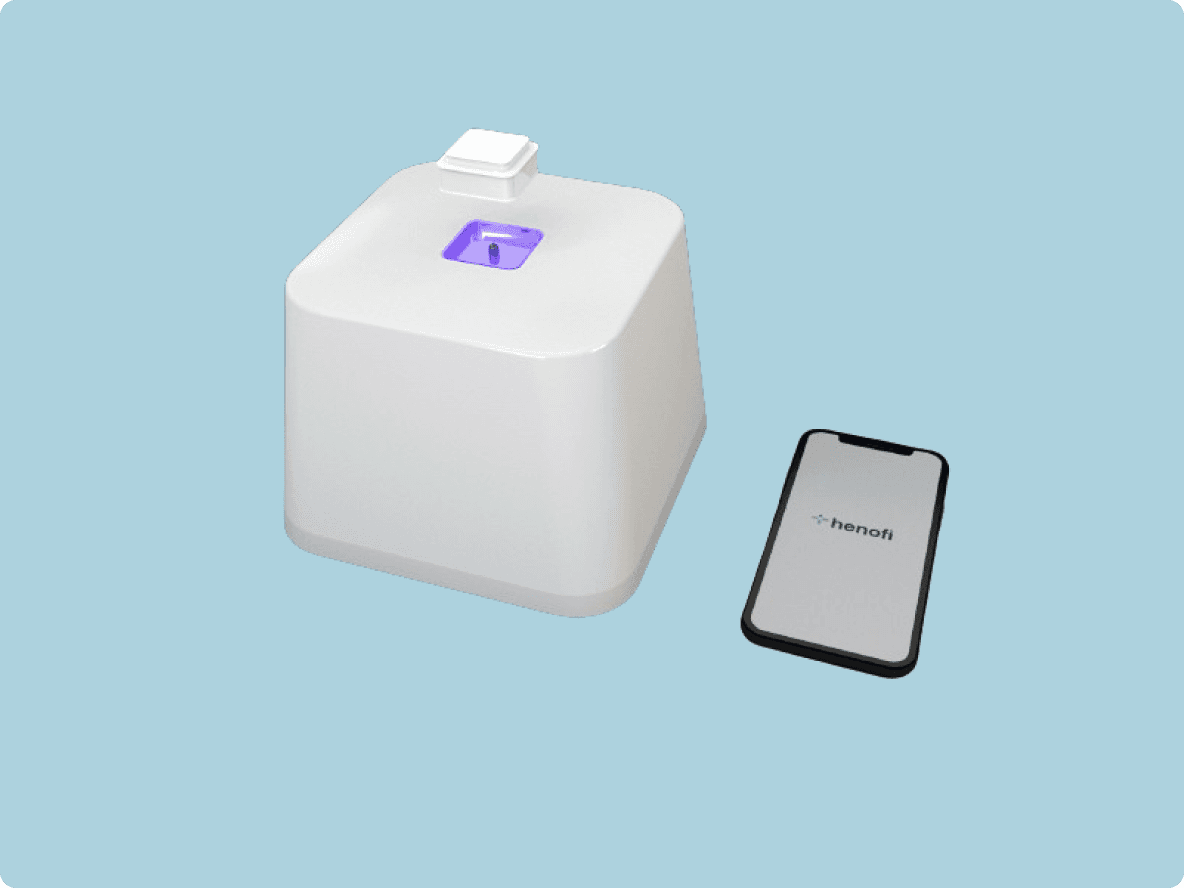
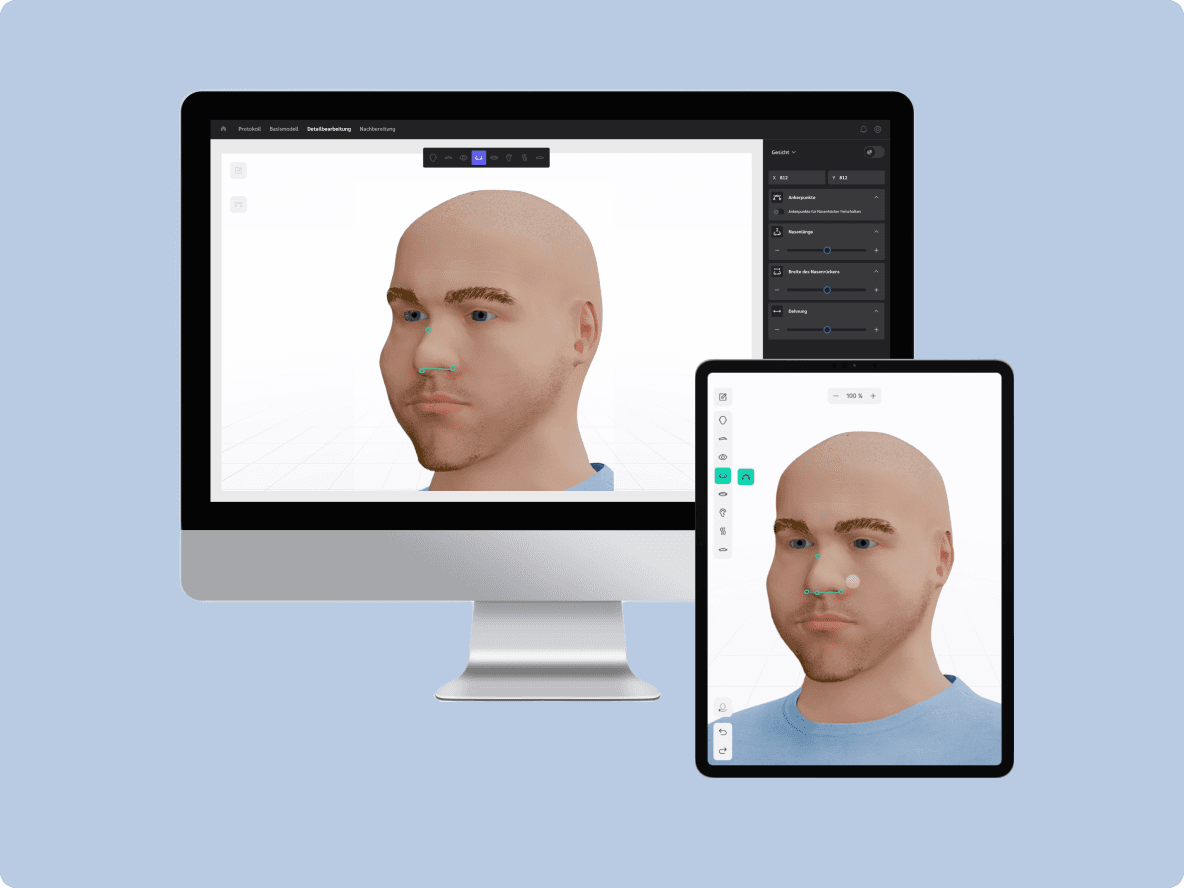
Through the Missing Link application, the witness's tablet is connected to the sketch artist's computer, enabling the artist to observe the witness's input.

Communication

Human interaction is crucial in this process, as the sketch artist supports the witness, building trust through dialogue. This communication helps reinforce memories and clarify necessary facial changes. The witness can indicate desired adjustments through gestures or descriptions, which the artist translates into tool actions on the tablet.

Tools

When the forensic sketch artist understands the witness's needs, they can unlock tools on the witness's tablet for face editing. This helps prevent overwhelming the witness, who may already feel anxious or unfamiliar with such technology.

Flexibility

Throughout the process, the artist assesses the witness's comfort and can adjust the tools accordingly. If the witness struggles with the situation or technology, the forensic sketch artist can take over and complete the sketch based on the witness's verbal instructions. The primary focus is the interpersonal interaction, ensuring a smooth and effective process. Once the witness is satisfied with the sketch, the collaboration ends. The forensic sketch artist then finalizes the image for submission, adding necessary presets for official use, completing their part in the process.
UI Design - Witness

These tools are user-friendly, even for first-time tablet users.

Simple Slider

A slider, with its simplicity and efficiency, helps prevent overwhelming the witness already stressed by the process. It offers immediate visual feedback, making adjustments intuitive and engaging. This consistency in design reduces the learning curve, allowing the witness to focus on recalling details rather than struggling with complex controls.

3D Models

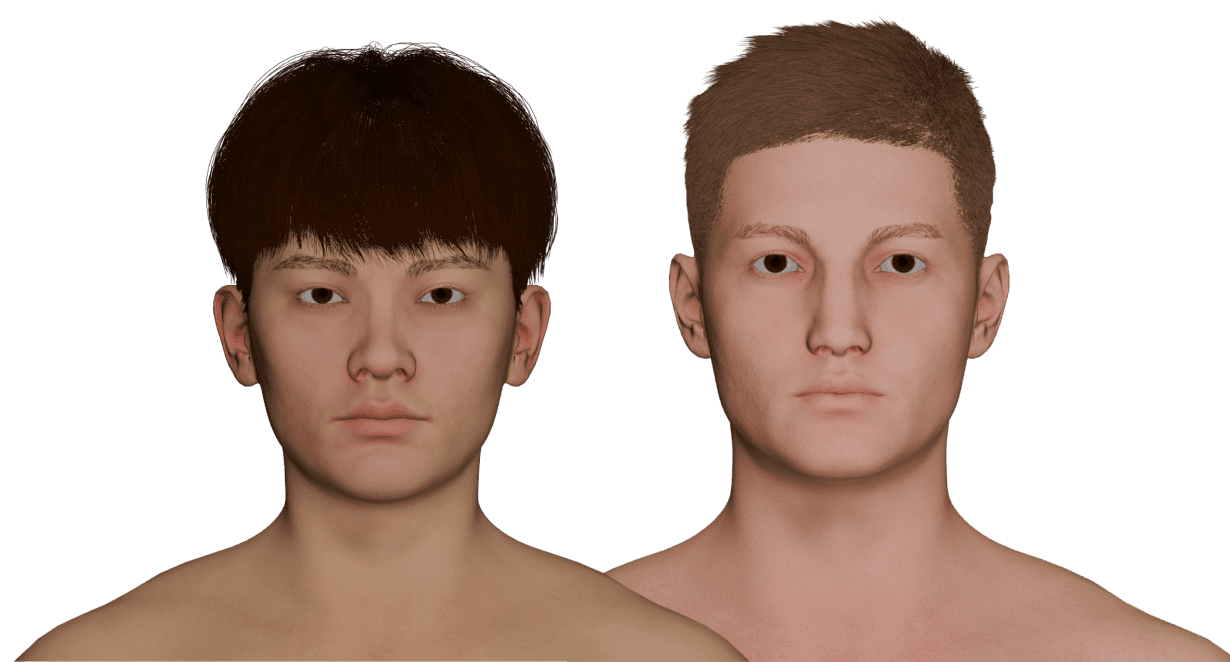
The model should strike a balance between realism and abstraction. If it's too realistic, it might distress the witness by bringing back traumatic memories. On the other hand, if it's too cartoonish, it won't effectively aid the witness in recalling the suspect's face. Therefore, a blend of both styles is used to achieve the best result.

Color

#00CF9D

Anchor Points

Using anchor points allows for intuitive facial adjustments, letting witnesses manipulate specific features directly on the tablet. This precise control makes it easier for witnesses to accurately recreate the suspect's face without feeling overwhelmed.

Round Corners

The overall design for the witness is kept rounder for a friendlier appearance.

UI Design - Witness

These tools are user-friendly, even for first-time tablet users.

Simple Slider

A slider, with its simplicity and efficiency, helps prevent overwhelming the witness already stressed by the process. It offers immediate visual feedback, making adjustments intuitive and engaging. This consistency in design reduces the learning curve, allowing the witness to focus on recalling details rather than struggling with complex controls.

3D Models

The model should strike a balance between realism and abstraction. If it's too realistic, it might distress the witness by bringing back traumatic memories. On the other hand, if it's too cartoonish, it won't effectively aid the witness in recalling the suspect's face. Therefore, a blend of both styles is used to achieve the best result.

Color

#00CF9D

Anchor Points

Using anchor points allows for intuitive facial adjustments, letting witnesses manipulate specific features directly on the tablet. This precise control makes it easier for witnesses to accurately recreate the suspect's face without feeling overwhelmed.

Round Corners

The overall design for the witness is kept rounder for a friendlier appearance.

UI Design - Forensic Sketch Artist

The forensic sketch artist's tool aims to be practical, making their routine work easier.

Indicators

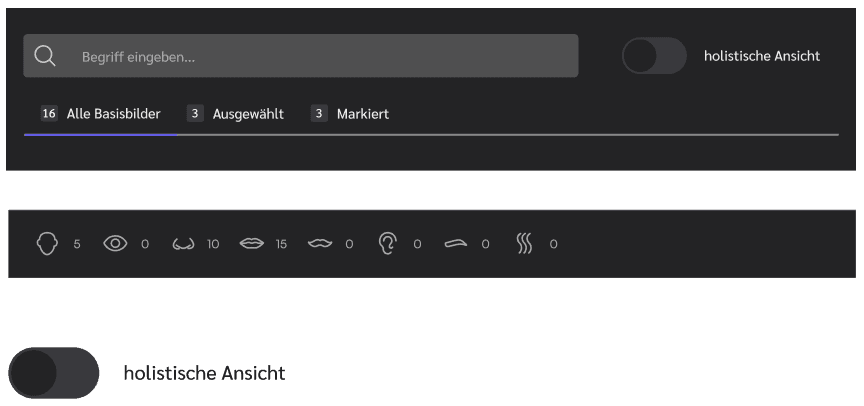
Through feedback on how many features have been selected and passed on, the forensic sketch artist is always informed about what options the witness has been given.

Drag & Drop

Tool activation is done via drag-and-drop. The tools are contained in a box, making them appear tangible, with their interactivity emphasized by the hover state.

Color

#7069F2

Angular Corners

The overall design for the forensic sketch artist is kept more angular for a professional appearance.

Toolbar

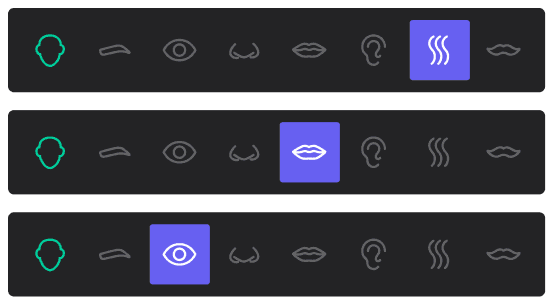
The toolbar for the features are not linked, which means you can see where the witness is currently located, in this case at the head shape, but the creator can and must be able to work independently in another feature or access it to unlock the tools.

Inactive

The activated tools for the witness are also visible in the mirroring. However, they do not appear clickable, as they are not intended to serve as call-to-action buttons for the forensic sketch artist but simply to show what the witness has.

UI Design - Forensic Sketch Artist

The forensic sketch artist's tool aims to be practical, making their routine work easier.

Indicators

Through feedback on how many features have been selected and passed on, the forensic sketch artist is always informed about what options the witness has been given.

Drag & Drop

Tool activation is done via drag-and-drop. The tools are contained in a box, making them appear tangible, with their interactivity emphasized by the hover state.

Color

#7069F2

Toolbar

The toolbar for the features are not linked, which means you can see where the witness is currently located, in this case at the head shape, but the creator can and must be able to work independently in another feature or access it to unlock the tools.

Inactive

The activated tools for the witness are also visible in the mirroring. However, they do not appear clickable, as they are not intended to serve as call-to-action buttons for the forensic sketch artist but simply to show what the witness has.

Angular Corners

The overall design for the forensic sketch artist is kept more angular for a professional appearance.

UI Design - Witness

These tools are user-friendly, even for first-time tablet users.

Color

#00CF9D

Round Corners

The overall design for the witness is kept rounder for a friendlier appearance.

Simple Slider

A slider, with its simplicity and efficiency, helps prevent overwhelming the witness already stressed by the process. It offers immediate visual feedback, making adjustments intuitive and engaging. This consistency in design reduces the learning curve, allowing the witness to focus on recalling details rather than struggling with complex controls.

3D Models

The model should strike a balance between realism and abstraction. If it's too realistic, it might distress the witness by bringing back traumatic memories. On the other hand, if it's too cartoonish, it won't effectively aid the witness in recalling the suspect's face. Therefore, a blend of both styles is used to achieve the best result.

Anchor Points

Using anchor points allows for intuitive facial adjustments, letting witnesses manipulate specific features directly on the tablet. This precise control makes it easier for witnesses to accurately recreate the suspect's face without feeling overwhelmed.

UI Design - Forensic Sketch Artist

The forensic sketch artist's tool aims to be practical, making their routine work easier.

Indicators

Through feedback on how many features have been selected and passed on, the forensic sketch artist is always informed about what options the witness has been given.

Angular Corners

The overall design for the forensic sketch artist is kept more angular for a professional appearance.

Drag & Drop

Tool activation is done via drag-and-drop. The tools are contained in a box, making them appear tangible, with their interactivity emphasized by the hover state.

Color

#7069F2

Toolbar

The toolbar for the features are not linked, which means you can see where the witness is currently located, in this case at the head shape, but the creator can and must be able to work independently in another feature or access it to unlock the tools.

Inactive

The activated tools for the witness are also visible in the mirroring. However, they do not appear clickable, as they are not intended to serve as call-to-action buttons for the forensic sketch artist but simply to show what the witness has.

UI Design - Forensic Sketch Artist

The forensic sketch artist's tool aims to be practical, making their routine work easier.

Indicators

Through feedback on how many features have been selected and passed on, the forensic sketch artist is always informed about what options the witness has been given.

Drag & Drop

Tool activation is done via drag-and-drop. The tools are contained in a box, making them appear tangible, with their interactivity emphasized by the hover state.

Color

#7069F2

Toolbar

The toolbar for the features are not linked, which means you can see where the witness is currently located, in this case at the head shape, but the creator can and must be able to work independently in another feature or access it to unlock the tools.

Inactive

The activated tools for the witness are also visible in the mirroring. However, they do not appear clickable, as they are not intended to serve as call-to-action buttons for the forensic sketch artist but simply to show what the witness has.

Angular Corners

The overall design for the forensic sketch artist is kept more angular for a professional appearance.

Experts

During the project, contacts were made with experienced forensic sketch artists who confirmed the validity of the concept. The idea of allowing witnesses to actively participate in creating the composite sketch under guidance was well-received, as experience has shown that this approach could have been helpful in many cases.